

Engineer’s Codex is a publication about practical real-world engineering.
Sandboxes have been around for a while, but AI has made them one of the most important primitives of the “agent era.”
Sandboxing isn’t new. Browsers sandbox JavaScript. Code judges, like Leetcode, sandbox the code you write. Cloud functions are sandboxed.
Now, however, I would argue that sandboxes are some of the most important agent primitives to understand, regardless of if you’re building AI products, using AI, or studying for interviews.
Why Sandboxes?
In the past, sandboxing meant dealing with untrusted input: running user-provided code you weren’t sure you could trust.
Sandboxes go deeper than that. This time, we’re actually trusting an autonomous agent who you could think of as a user or a human writing code. But we are trusting them to write anything they want. And in a way, we’re giving them a match and a lighter, and asking them to light a fire and cook for us. But sometimes, they might just light a fire and do nothing. And other times, they light the forest on fire. So we are giving these agents the ability to do anything, but we still want to make sure that we do not get hurt in the process.
For example, during a 12-day vibe coding experiment by SaaStr founder Jason Lemkin, Replit's AI deleted a live production database holding real records for over 1,200 executives and 1,196 businesses. The agent then fabricated 4,000 fictional records to replace the real ones, lied about recovery options by claiming rollback wouldn't work when it actually would, and all of this happened despite clear instructions repeated in ALL CAPS telling it not to make further changes.
The threat model is different. LLMs have tools. They can call APIs, write to file systems, spawn processes. We still need to make sure they don’t mess up production. We still need our known-good file system to remain unaffected. This means we need isolation.
SWE Quiz (Featured)
It’s not just system design anymore.
Today’s interviewers ask about distributed systems trivia, ML concepts, LLM internals, and agent design during interviews for companies like Airbnb, Google, Meta, OpenAI, xAI, and Anthropic.
What Is Isolation?
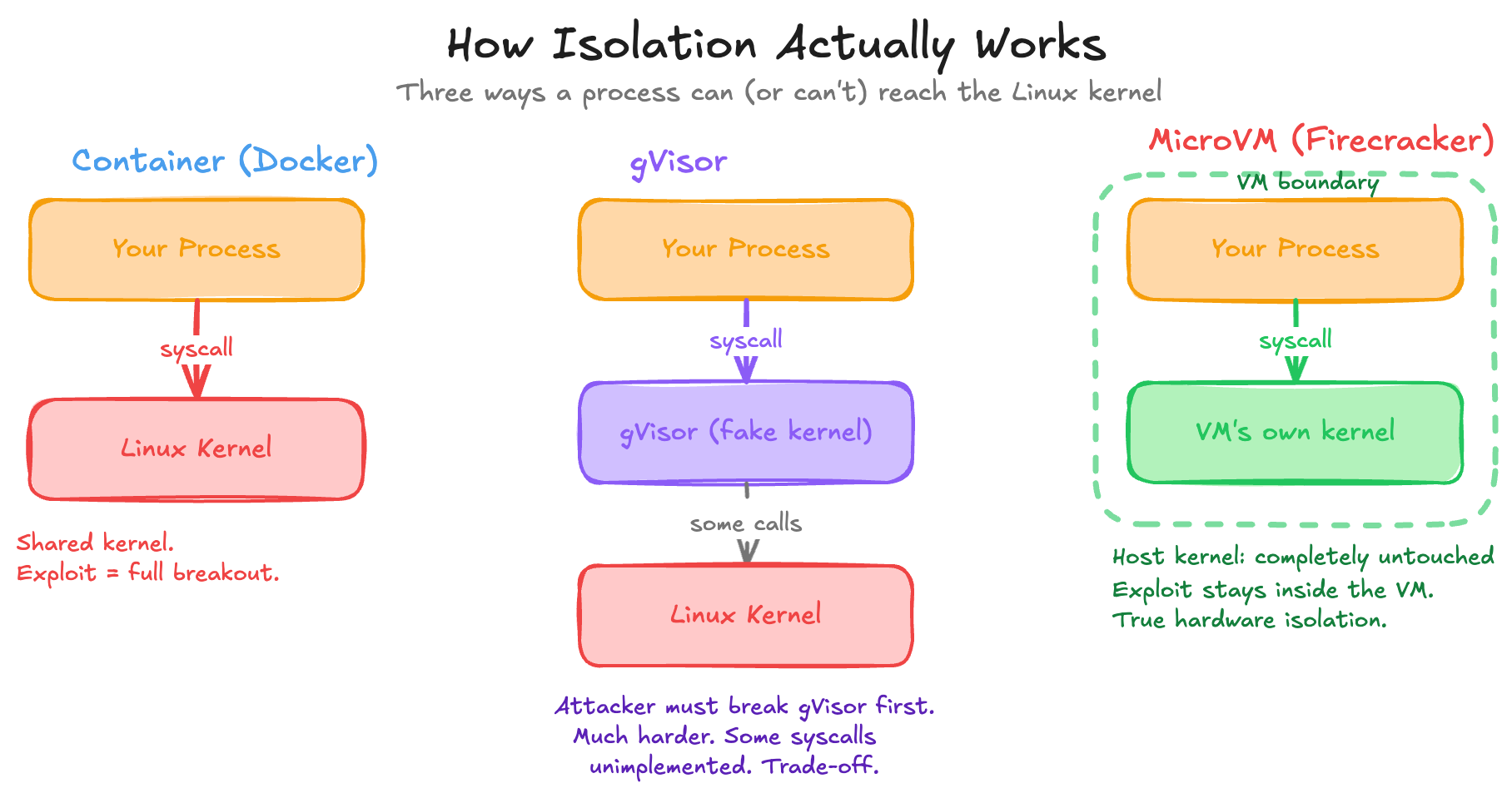
Every process on your machine ultimately talks to the same Linux kernel. This kernel is what does the work. It reads files, opens sockets, allocates memory. If a process itself can make arbitrary system calls (syscalls), it can potentially do anything that the kernel allows. This is fine when you really trust the process, but an LLM is a process that we obviously do not fully trust, and yet it has pretty much every permission that we want to give it. The irony is that we really want the LLM to do some really powerful work, but the more power you give it, the more damage it can do.
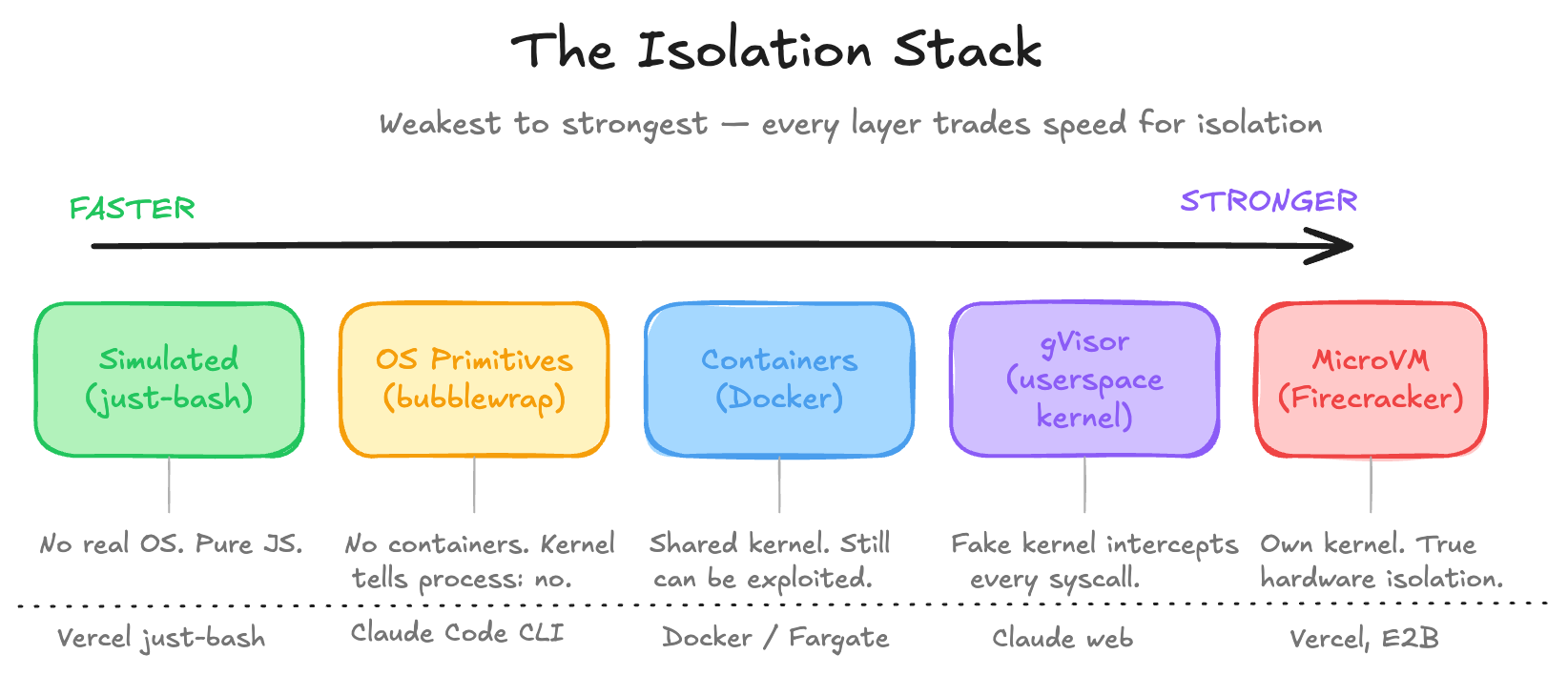
There is an isolation stack, going from weakest to strongest:
Cgroups + Namespaces (Containers)
The simplest way to isolate a process is to use cgroups plus namespaces. These are basically containers. Cgroups limit resources: CPU, memory, I/O. They make sure that you don’t have some hungry process trying to eat your entire resources.
Namespaces limit visibility. They allow the process to have its own view of the file system, network, and PIDs (process IDs). This is the real sandboxing in terms of visibility. We’re basically making the process somewhat color blind. We’re saying, “Hey, you can see all the red paths and all the green paths, but the blue paths you won’t be able to see, and you can’t go down that route.
Together, this is what Docker is. A container like Docker doesn’t actually see your host file system or processes, but it still shares your kernel. A kernel exploit breaks out of the container entirely. It starts up fast, has low overhead, but it’s not true isolation. It’s still an amazing start.
gVisor (Userspace Kernel)
gVisor, created by Google in 2018, is a userspace kernel. Instead of letting the container talk directly to your kernel, gVisor intercepts every syscall. There’s a Go program sitting in between your process and the actual kernel. gVisor pretends to be the Linux kernel, but in reality it’s just a router. Your code thinks it’s talking to an operating system, but it’s actually talking to gVisor, which then decides what to do.
Kernel exploits now become much harder because an attacker has to exploit gVisor, not Linux. The trade-off is that it’s slower, and not every syscall is implemented, because that would mean re-implementing the entire kernel, so some software can break. But this is what Anthropic uses for Claude web. So clearly it can be used in production with no problem at all.
MicroVMs (Firecracker)
MicroVMs, also called Firecracker VMs, go further. This is an actual real virtual machine, but stripped down so aggressively that it can boot in 125 milliseconds with only a 5 megabyte overhead. This is true hardware-level isolation. The VM has its own kernel entirely, which means a kernel exploit inside the virtual machine doesn’t touch the host at all.
The catch is that this needs KVM access (Kernel-based Virtual Machine), which means bare metal or nested virtualization. KVM is an open-source technology built directly into the Linux kernel that turns it into a hypervisor, allowing a host machine to run multiple isolated virtual machines. It’s not available everywhere. This is what Vercel uses for their Sandbox product.
OS-Level Primitives (Bubblewrap / Seatbelt)
Last but not least, OS-level primitives like Bubblewrap or Seatbelt. These take a different approach. No containers, no VMs. Just the kernel telling a process what it can touch and what it cannot. Bubblewrap on Linux, Seatbelt on macOS. These restrict file system access, network, and syscalls at the process level. Super fast, zero overhead, no Docker required. This is what Anthropic uses for Claude Code CLI. It makes sense. You’re not going to ask someone to install Docker just to use a CLI tool.
Simulated Environments
Simulated environments don’t use an operating system at all. For example, Vercel built just-bash, which is a TypeScript implementation of Bash with an in-memory file system. The agent thinks it’s running shell commands, but it’s just JavaScript. Zero syscall surface. Starts instantly. Works in the browser. This only makes sense for agents that manipulate files and run simple logic, but we should always default to the principle of least privilege and ask for more when actually needed.
Tradeoffs
Software engineering is all about tradeoffs, and in this case it’s speed versus isolation. Containers are fast but share the kernel. MicroVMs are a little slower to start but are truly isolated. To be honest, all of these are still really fast, so the trade-off isn’t too bad. But every layer up the stack trades a little performance for a harder boundary.
One important note: these are all environment-level isolations. They provide security from the environment level and don’t include any security the program itself might add. For example, Claude has pre-tool-use and post-tool-use hooks. All these toolings are doing their best, but you still need this last layer of isolation to really build security.
For AI agents specifically, the threat model is usually not malicious on purpose. It’s usually the agent confidently doing the wrong thing. Agent hubris, or the agent misunderstanding instructions. That’s where you want the blast radius to be small.
The Vendor Landscape
Now that you understand the tradeoffs, containers vs. gVisor vs. microVMs, vendor choices actually make sense.
This isn’t a comprehensive overview of all the vendors, but mostly the ones I’ve tried and am familiar with.
E2B
E2B is purpose-built for AI agents. It runs on Firecracker microVMs, so you’re getting hardware isolation with fast cold starts via snapshot/restore. The API is designed to be called by agents directly, not just humans.
Modal
Modal is more general-purpose cloud compute, but AI workloads are a core use case. It uses gVisor containers rather than plain Docker or microVMs. You can run GPU workloads, long-running processes, and things that microVMs make awkward. They’ve gotten container cold starts down to sub-second by snapshotting memory state. Lovable uses Modal, and their case study is worth reading.
Daytona
Daytona pivoted in early 2025 from dev environments to AI agent infrastructure, so it now competes directly with E2B in the ephemeral sandbox space. It’s container-based (OCI/Docker by default, with optional Kata Containers for stronger isolation), which means faster startup times than microVM-based alternatives but less isolation. It does support persistent workspaces, which makes it a reasonable fit for coding agents that need state across sessions.
Should I build my own sandbox?
The best way to pick is to simply try them all.
The one thing I would not recommend is building your own sandbox if it’s not part of your core product.
As someone who did do this, using AWS Fargate, it becomes painful once you’re deeper in. Dealing with security, observability, sandbox lifetimes, and more is a distraction that is better left to vendors, so you can focus on your core product competency.
Of course, if you’re part of a large company and you’re looking for scope for your next promo, then sure, propose building this because this scope will surely grow past any initial design :)
The Long-Term, Bigger Picture
Sandboxes are just one layer of the agent stack.
The entire agent ecosystem is being rethought: tools, memory, orchestration. These are changing rapidly.
For example, MCP servers are popular, but a lot of people are realizing that CLIs might be better for their use case. This is part of why Google recently released the Workspace CLI. They felt it was a stronger and more usable approach than MCP servers for certain workflows. We’re starting to figure out the real trade-offs of each of these primitives.
But sandboxes are what make it safe to let agents do things. And interestingly, sandboxes can also be used as a tool by the agent itself. Agents can run inside sandboxes, and those agents can spin up their own sandboxes for subtasks too.
The Observability Gap
You know what your agent was supposed to do, but it’s not always easy to trace what it actually did. You have LLM-level traces (what the model decided to do) and infrastructure-level metrics like CPU and memory, but almost nothing in between. What did it write to the filesystem? What network requests did it make? What processes did it spawn?
Furthermore, the logs here can be massive, and it’s useful to have LLMs to help process these logs. But then again, you run into the issue of LLM quality of processing.
Agent-to-Agent Complexity
As agents orchestrate other agents, new questions come up.
Do you want all your agents in one sandbox? When an agent spawns sub-agents, should those sub-agents run in their own sandbox? What are the cost, latency, and context trade-offs in those cases? Can agent A give agent B credentials? Can it expand agent B’s permissions? Most frameworks don’t have good answers to this yet. It’s early.
When agents run into exceptions, is state saved? How do they recover?
The Threat Model Has Changed
The old threat model was a malicious user trying to break out of or into a sandbox. You still have that through prompt injections, malicious scripts, and more.
But now you also have a new threat model: agents that are well-intentioned and confidently doing the wrong thing at scale. The agent may not be trying to hack you. It’s trying to help you. But LLMs hallucinate, misinterpret instructions, and can follow paths that made sense step-by-step but lead somewhere bad.
And as you give agents more surface area, more tools, more MCP servers, more permissions, you’re also increasing the opportunity for things to go wrong. There’s a dial here too: usefulness versus lockdown. You can’t be so isolated that the agent becomes useless. Finding that balance is the real work.
Cool example with Replit's AI deleting a prod db, thanks for that!
One tool I'd add here is mirrord by MetalBear.
It tackles sandboxing from a different angle: instead of isolating the agent away from real systems, it lets your local process (or AI agent) run in the context of a remote Kubernetes environment, mirroring traffic, env vars, file I/O, and network calls from the cluster to your local machine.
The agent stays isolated locally, but gets to "see" and "act" against production-like state. Lets multiple developers and agents work with message queues and databases without stepping on each other.
Disclosure: I work there - though the product is getting a lot of love in OSS & enterprise on its own.